
Picking the right model is the new bottleneck
Running an AI agent like OpenClaw locally is easier than ever. The hard part isn't the runtime — it's what you plug into it.
Should everything go through GPT-5.5? Send vision to Claude? Is DeepSeek's price still half OpenAI's this week? Did Kimi just push a context-window update? Which provider is having a degraded weekend? Most people end up with three or four billing relationships, three or four sets of credentials, three or four sets of failure modes — and they still don't know if they're routing the right work to the right model. Model selection has quietly become the friction that ate the productivity gains.
Here's the difference, side by side:
| Without a Router | With Qtum Router |
|---|---|
| Multiple accounts | One account |
| Multiple API keys | One API key |
| Multiple balances | One balance |
| Different endpoints | One endpoint |
| Manual provider switching | Simple model switching |
If you've worked with OpenClaw before, the pattern will feel familiar — providers like OpenRouter are commonly used as unified OpenAI-compatible endpoints across the ecosystem. The Qtum AI Router takes the same idea Qtum-native: QTUM-credit billing, a built-in dashboard, and the dual-format (OpenAI + Anthropic) support covered below.
What is the Qtum AI Router?
The Qtum AI Router is Qtum's unified inference layer — OpenAI- and Anthropic-compatible endpoints that route requests across multiple AI providers and models. Currently in beta. The pitch is short:
- Single API key. One credential for the entire catalog. No more juggling four dashboards and four monthly invoices.
- OpenAI and Anthropic compatible. Two wire formats supported out of the box — OpenAI Chat Completions and Anthropic Messages. Any client that speaks either works without code changes; just point it at the Qtum base URL.
- Access multiple providers. GPT-5.x, DeepSeek, Kimi, GLM, Qwen, MiniMax, more added on a rolling basis. The catalog is live and queryable at
/v1/models. - Centralized billing. One bill, settled in QTUM credits. No tracking quotas across half a dozen providers; no surprise overages on the one you forgot about.
- Easy model switching. Change models with a config flag — same key, same code path, different backend behind the scenes.
- No vendor lock-in. Standard wire formats mean anything that ever supported OpenAI or Anthropic works here. Walk away whenever you want — your client code doesn't change.
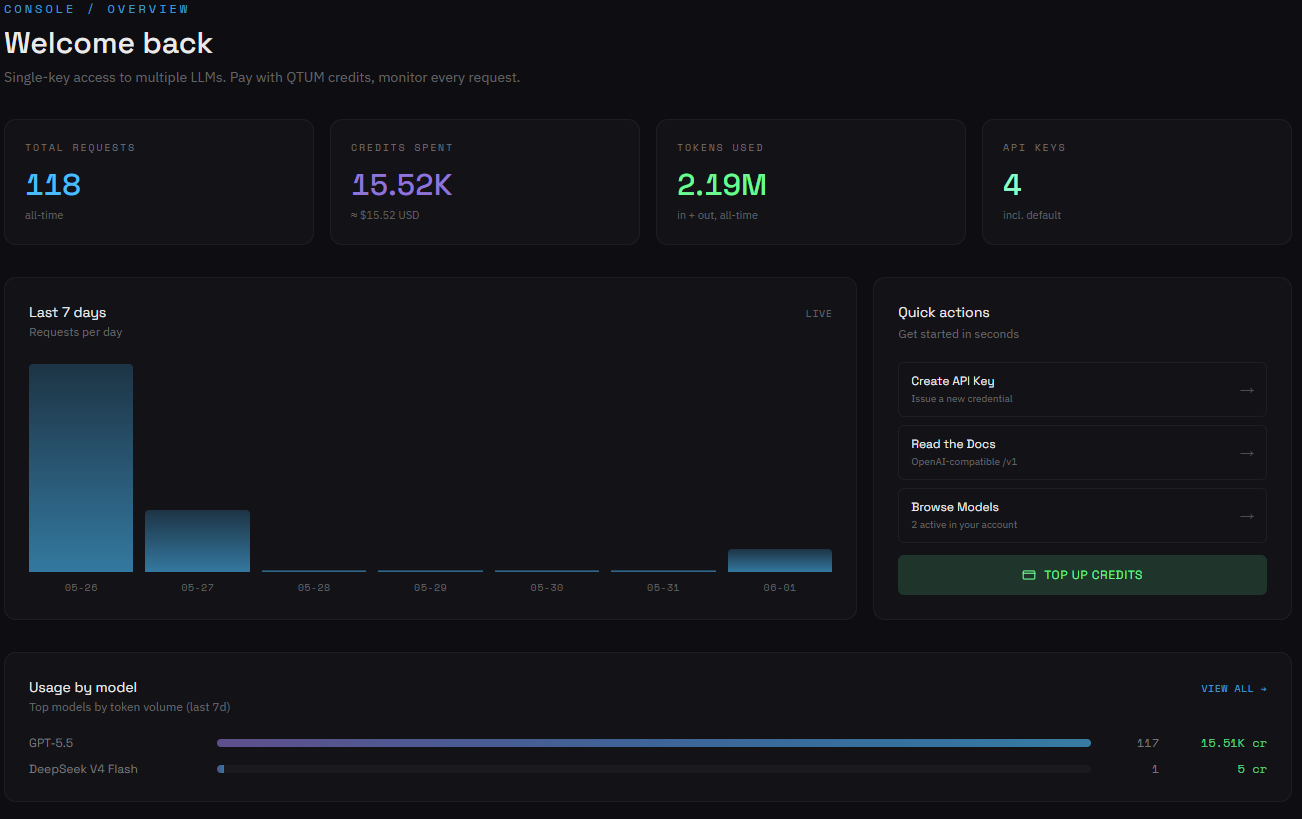
console.qtum.ai — single-key access, request and credit metrics across every model in the catalog, and a usage breakdown by model. One bill, one place to look.Six model families. One endpoint.
The full catalog at time of writing, queried live from the Qtum AI Router:
| Model family | Models in the catalog | Through Qtum Router |
|---|---|---|
| GPT | gpt-5.5, gpt-5.4, gpt-5.4-mini |
✓ |
| DeepSeek | deepseek-v4-pro, deepseek-v4-flash |
✓ |
| Qwen | qwen3.7-max, qwen3.6-plus, qwen3.6-max-preview, qwen3.6-flash |
✓ |
| Kimi | kimi-k2.6 |
✓ |
| GLM | glm-5.1 |
✓ |
| MiniMax | MiniMax-M2.5 |
✓ |
All available under one key, billed in QTUM credits. The catalog is fetched live on every gateway restart — when Qtum adds a new family or model, it appears automatically with no client update needed.
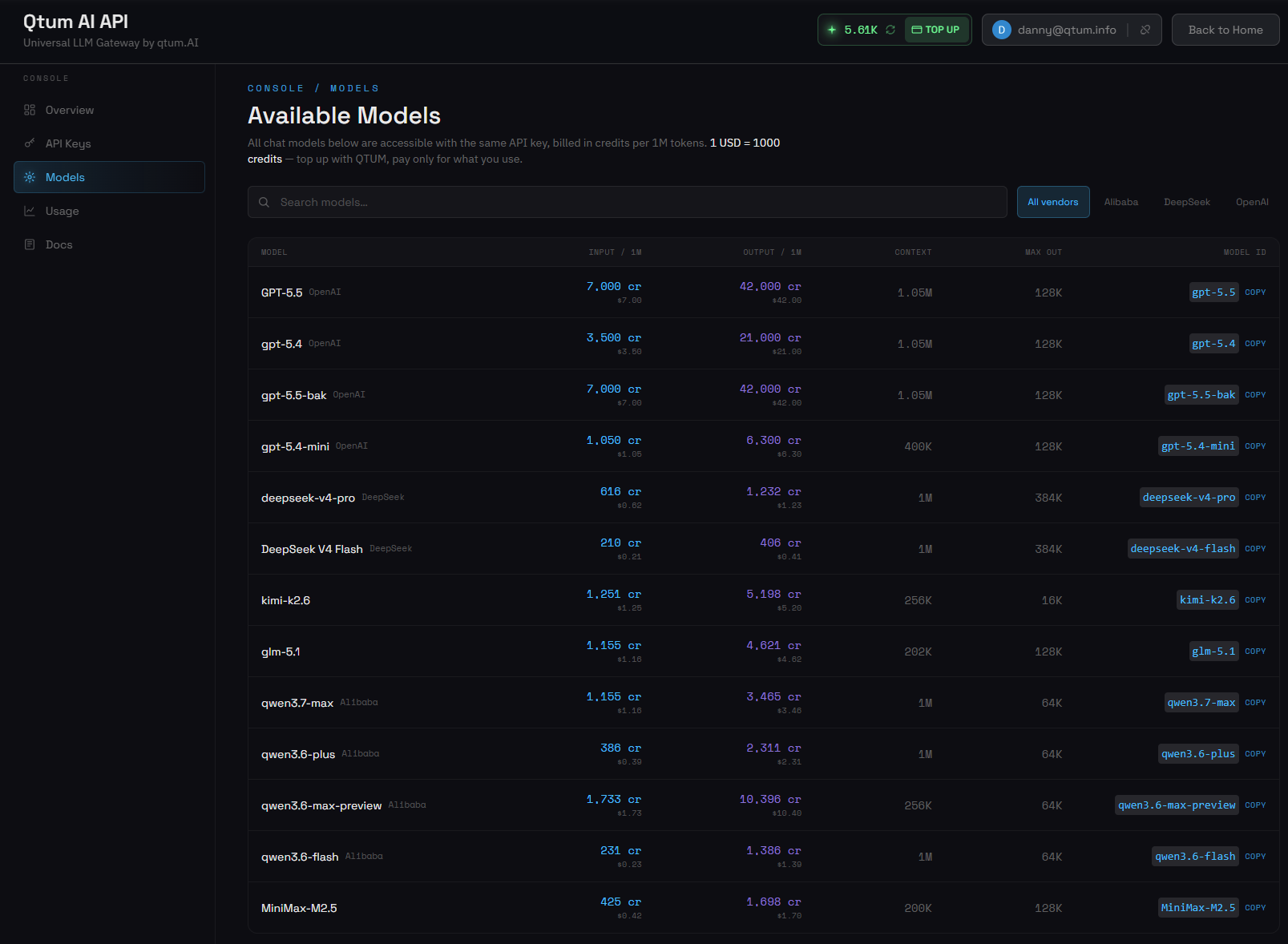
openclaw models set qtum/<id>. Top up with QTUM, pay only for what you use.Get an API key at qtum.ai. The rest of this article walks through one way to put that key to work — wiring it into OpenClaw so the entire catalog appears as native OpenClaw models you can switch between with a single command.
How OpenClaw connects to the Qtum AI Router
OpenClaw is an open-source personal AI assistant — a gateway process, an agent runtime, a CLI, and a pluggable provider system. The openclaw-plugin-qtum plugin teaches OpenClaw about the Qtum router: it registers qtum as a first-class provider, so any model in the Qtum catalog becomes a normal OpenClaw model id (qtum/gpt-5.5, qtum/deepseek-v4-pro, …). One auth profile, every model on tap, automatic catalog refresh.
Here's how the pieces fit together:
Don't have OpenClaw installed yet?
Most readers will want the full OpenClaw install guide, but the shortest path that gets you to a working gateway and a default agent is three commands. If you already have OpenClaw running, skip ahead to the three Qtum steps.
# 1. Install via npm (Node 20+ required)
npm i -g openclaw

# 2. Run the onboarding wizard — picks a port, generates a gateway
#    token, installs a systemd / launchd service, walks you through
#    your first agent and basic skills
openclaw onboard

# 3. Confirm the gateway is up
openclaw status
Once openclaw status shows a healthy gateway and a default agent (typically called main), you're ready for the Qtum wiring. The OpenClaw side never has to be touched again.
Three steps to add the Qtum AI Router to OpenClaw
Install the qtum plugin
The plugin is a small Node module that registers qtum as a new provider inside OpenClaw — once it's loaded, every model in the Qtum catalog shows up as a normal OpenClaw model id you can target with openclaw models set. Clone the repo and install it as an extension:
sudo -iu openclaw bash <<'EOF'
export PATH=$HOME/.npm-global/bin:$PATH
export XDG_RUNTIME_DIR=/run/user/$(id -u)
export DBUS_SESSION_BUS_ADDRESS=unix:path=/run/user/$(id -u)/bus

cd ~
git clone https://github.com/Dannnymack/openclaw-plugin-qtum
openclaw plugins install ./openclaw-plugin-qtum

systemctl --user restart openclaw-gateway
EOF
Verify the plugin is loaded and healthy:
sudo -iu openclaw env PATH=$HOME/.npm-global/bin:$PATH openclaw plugins doctor
And in the gateway log:
Wire up your Qtum API key
OpenClaw stores provider credentials in per-agent auth-profiles.json files. To register your Qtum key, write a qtum:default profile to the main agent's file and tell OpenClaw to treat it as the default for the qtum provider. Grab your key from qtum.ai and substitute it below:
sudo -iu openclaw bash <<'EOF'
AUTH_FILE=~/.openclaw/agents/main/agent/auth-profiles.json
install -m 0600 /dev/null "$AUTH_FILE"
cat > "$AUTH_FILE" <<'JSON'
{
  "version": 1,
  "profiles": {
    "qtum:default": {
      "type": "api_key",
      "provider": "qtum",
      "key": "sk-...your-key..."
    }
  },
  "lastGood": {
    "qtum": "qtum:default"
  }
}
JSON
chmod 0600 "$AUTH_FILE"

export PATH=$HOME/.npm-global/bin:$PATH
export XDG_RUNTIME_DIR=/run/user/$(id -u)
export DBUS_SESSION_BUS_ADDRESS=unix:path=/run/user/$(id -u)/bus
openclaw models set qtum/gpt-5.5
systemctl --user restart openclaw-gateway
EOF
lastGood block matters: OpenClaw uses it to pick a profile automatically when a request needs one. Without it, the profile sits in the file but never gets used, and you get auth-resolution errors that look unrelated to auth.
Verify the route
One last sanity check. Send a prompt through the agent and watch the metadata come back with qtum as the provider:
sudo -iu openclaw env PATH=$HOME/.npm-global/bin:$PATH \
  openclaw agent --agent main -m "Reply pong" --json \
  | jq '{
      provider: .result.meta.agentMeta.provider,
      model:    .result.meta.agentMeta.model,
      reply:    .result.payloads[0].text
    }'
That's traffic going through the Qtum AI Router, billed in QTUM credits, returned to OpenClaw's agent runtime.
The catalog at your fingertips
The setup work is done — but the real payoff isn't the verification call you just ran. It's what comes next. Switching to any other model in the Qtum catalog is a one-line command:
# cheap, fast, text only — great default for chat-heavy workloads
openclaw models set qtum/deepseek-v4-pro

# 200k context window, text + vision
openclaw models set qtum/kimi-k2.6

# smaller, cheaper member of the GPT-5 family
openclaw models set qtum/gpt-5.4-mini

# multilingual specialist with vision
openclaw models set qtum/qwen3.7-max

# frontier multimodal
openclaw models set qtum/MiniMax-M2.5

systemctl --user restart openclaw-gateway
Same auth profile. Same billing. Same OpenClaw install. Different model under the hood. When Qtum adds a new model to the catalog, it shows up automatically — the plugin re-fetches /v1/models on every gateway restart, so you never have to bump a plugin version or edit a config file to get access.
You can also run different agents on different models. If you want a cheap default for chat, a stronger model for code, and a vision-capable one for image work, set them per-agent in ~/.openclaw/openclaw.json. The plugin tags each model with its known modalities (text-only for the DeepSeek family, text + image for the GPT-5.x, Kimi, GLM, Qwen, and MiniMax families), so OpenClaw's image tool won't try to send a picture to a text-only model.
openclaw models set qtum/<new-id> and you're testing it in production seconds later. No new API integration, no new key, no new billing relationship.
How to remove the Qtum plugin from OpenClaw
If you ever want to back out without touching the rest of your OpenClaw install, two lines do it:
# Uninstall the plugin and restart the gateway
openclaw plugins uninstall qtum
systemctl --user restart openclaw-gateway

# Optional: remove the qtum:default profile from
# ~/.openclaw/agents/<agent>/agent/auth-profiles.json
OpenClaw itself, your other providers, and your agent sessions stay exactly as they were. The Qtum API key is the only credential to also revoke server-side at qtum.ai if you want a complete tear-down.
Qtum: more than a router
The router doesn't exist in isolation. It's the inference layer of a larger network that's been quietly running production traffic since 2017 — and that matters when you're picking where to point your application's brain.
A blockchain with seven years of uninterrupted operation
Qtum's underlying blockchain launched in 2017 and hasn't had downtime since — a stability profile that's surprisingly rare in this industry. The network combines Bitcoin's UTXO security model with EVM-compatible smart contracts, runs on Proof-of-Stake consensus, and has shipped 50 core updates over eight years without breaking the chain. AI services need predictable, uninterrupted operation; that's been load-bearing for Qtum since day one.
The Qtum ecosystem
- Qtum blockchain — Bitcoin-secured UTXO with Ethereum-compatible smart contracts, since 2017.
- Qtum.ai — AI video generation for creators and businesses.
- Qtum AI Router — the unified inference routing we've been using here. AI model routing, multi-model inference, distributed GPU compute, low-latency request handling, agent-compatible infrastructure.
- Qtum Ally — a desktop AI agent that integrates multiple LLMs out of the box.
- GPU infrastructure — the compute layer powering inference and generation workloads across the network.
The takeaway: the router lets you start small — one API key, one OpenClaw install — and grow into the rest of the stack whenever it makes sense. No commitment beyond the next prompt.
Try it yourself
The full setup above takes under ten minutes once you have a Qtum API key. One endpoint, one bill, every model the router supports — text and vision, switchable with a single command, automatic catalog updates as Qtum adds new providers.
Stop juggling provider integrations. Start routing.