Running an AI agent locally is easier than it has ever been. The hard part is no longer the runtime — it is what you plug into it.
Should everything go through GPT-5.5? Send the vision work to Claude? Is DeepSeek still half the price this month? Which provider is having a degraded weekend? Most people end up with four billing relationships, four sets of credentials and four sets of failure modes, and still have no idea whether the right work is reaching the right model. Model selection has quietly become the friction that ate the productivity gain.
| Without a router | With the Qtum AI Router |
|---|---|
| Several accounts | One account |
| Several API keys | One API key |
| Several balances | One balance |
| Different endpoints | One endpoint |
| Switching provider means new code | Switching model means a new string |
This post is the practical half of that story: how to point OpenClaw at the Qtum AI Router so the entire catalogue shows up as native OpenClaw model ids. If you want the Router itself explained first, start with one API key for every model.
What the Router gives OpenClaw
The Router is an OpenAI- and Anthropic-compatible endpoint in front of 91 models: 60 text, 13 image, 12 video, 3 audio and 3 decision models, from the GPT, Claude, Gemini, Qwen, DeepSeek, GLM, Kimi, MiniMax, Hunyuan, Seedance, Wan and Sora families. One key authenticates all of them and one credit balance pays for all of them.
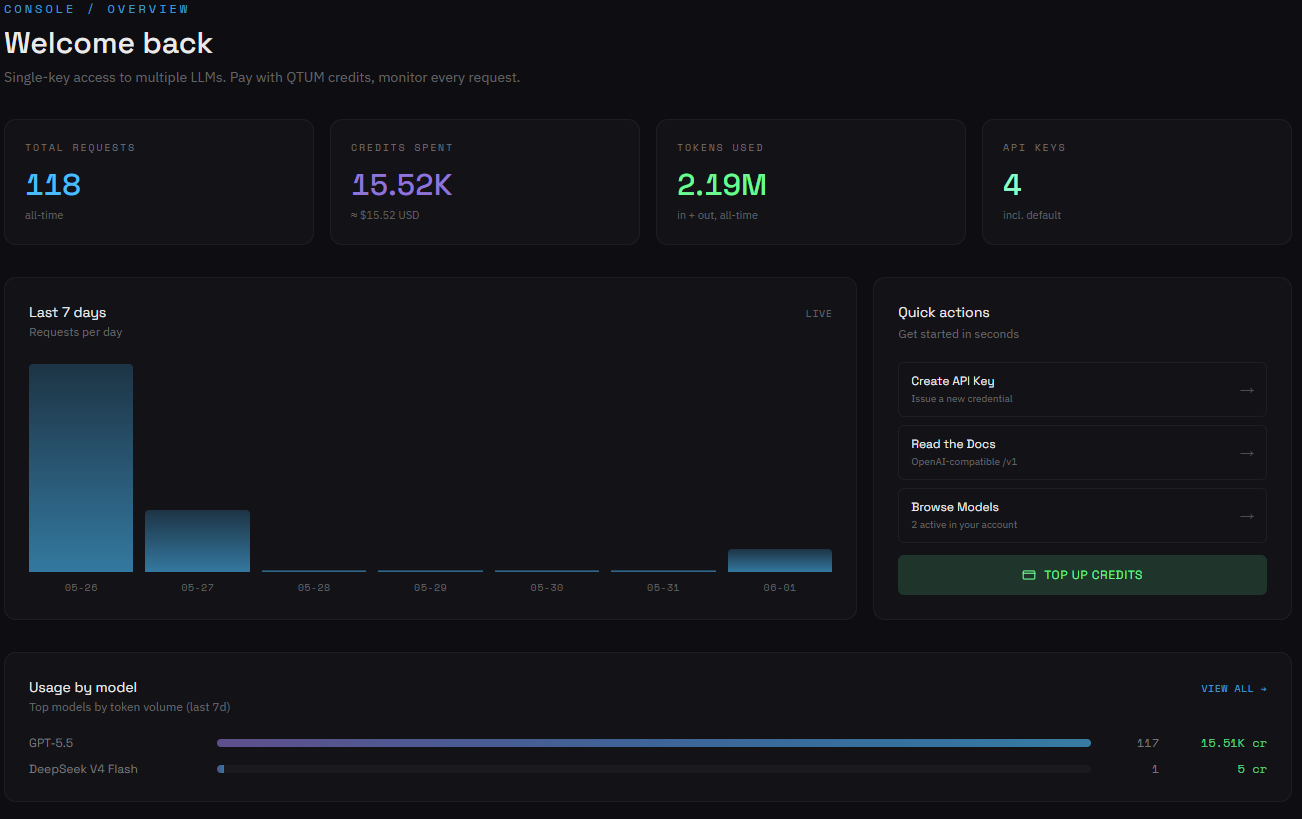
Two properties matter for an agent in particular:
- Standard wire formats. Chat Completions and Anthropic Messages, both supported directly. Anything that ever spoke to OpenAI or Anthropic works here with a base URL and a key — no SDK, no adapter, no lock-in.
- A live catalogue. The model list is served from
/v1/modelsand refreshed from upstream every minute. When a model is added, clients see it without a release.
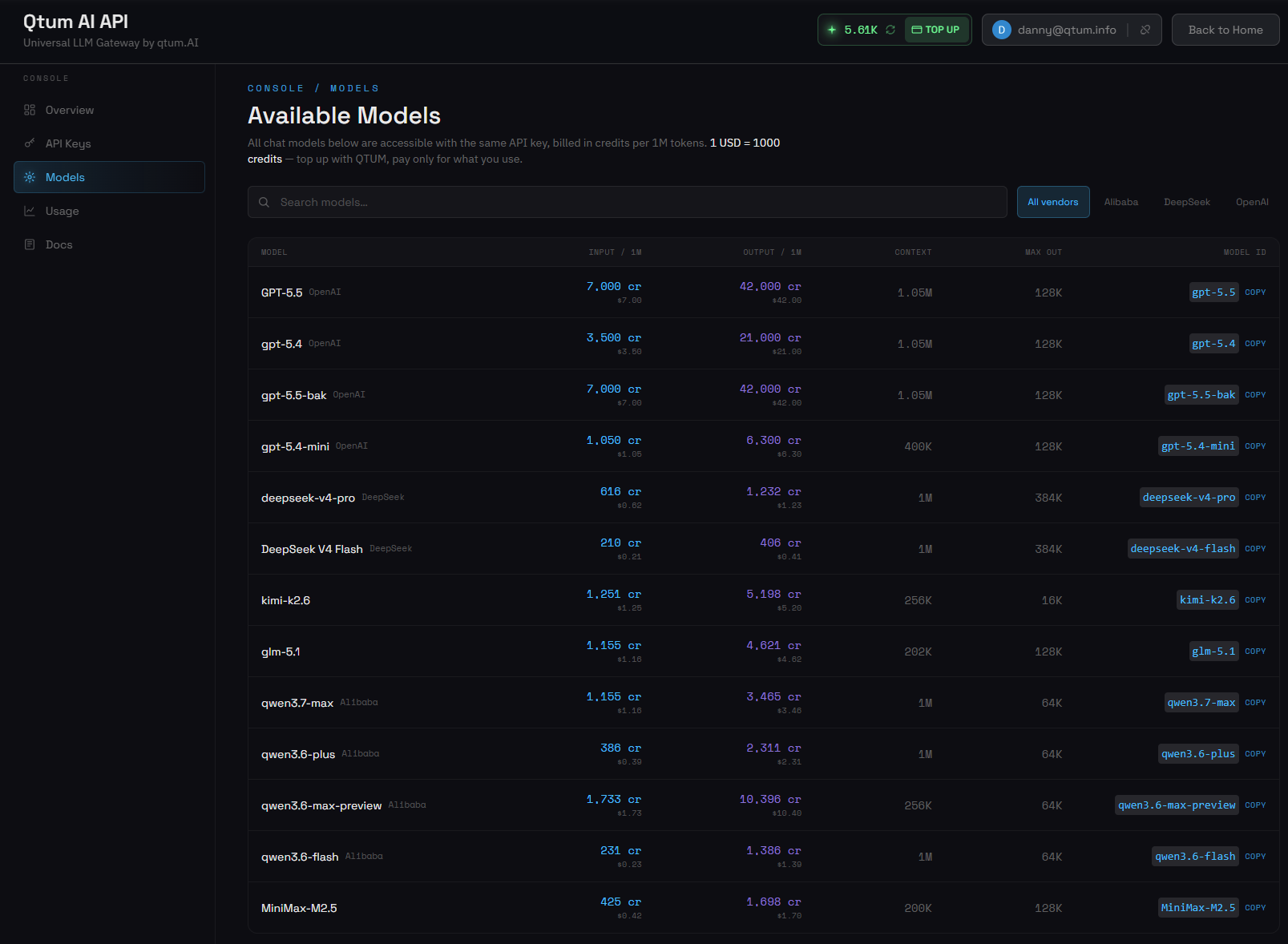
Current prices and context windows are on the models page; the integration guide has the raw HTTP calls.
How the pieces fit
OpenClaw is an open-source personal AI assistant: a gateway process, an agent runtime, a CLI and a pluggable provider system. The openclaw-plugin-qtum plugin teaches it about the Router — it registers qtum as a first-class provider, so every model in the catalogue becomes an ordinary OpenClaw model id (qtum/gpt-5.5, qtum/deepseek-v4-pro, …), under one auth profile, with the catalogue refreshed on every gateway restart.
  your laptop / CLI / Control UI
                │
┌───────────────▼────────────────┐
│  YOUR SERVER                   │
│  ┌──────────────────────────┐  │
│  │  OpenClaw gateway        │  │
│  │  :56663 · token auth     │  │          ┌──────────────────────────┐
│  ├──────────────────────────┤  │  HTTPS   │  Qtum AI Router          │
│  │  qtum plugin             │──┼─────────▶│  OpenAI + Anthropic      │
│  │  ~/.openclaw/extensions/ │  │          │  compatible, QTUM-billed │
│  └──────────────────────────┘  │          │                          │
└────────────────────────────────┘          │  gpt · claude · gemini   │
                                            │  deepseek · qwen · glm   │
                                            │  kimi · minimax · …      │
                                            └──────────────────────────┘
The plugin is a convenience, not a requirement. The Router works with nearly any agent or SDK that speaks Chat Completions or Anthropic Messages — point an existing client at the base URL, drop in the key, and it is routed. OpenClaw is simply a clean way to show the integration end to end. Claude Code is another.
No OpenClaw yet?
Most people will want the full install guide, but the shortest path to a working gateway and a default agent is three commands:
# 1. Install via npm (Node 20+)
npm i -g openclaw

# 2. Onboarding: picks a port, generates a gateway token, installs a
#    systemd / launchd service, walks you through your first agent
openclaw onboard

# 3. Confirm the gateway is up
openclaw status
Once openclaw status reports a healthy gateway and a default agent (usually main), the OpenClaw side never has to be touched again.
Step 1 — install the qtum plugin
The plugin is a small Node module that registers qtum as a provider. Clone it and install it as an extension:
sudo -iu openclaw bash <<'EOF'
export PATH=$HOME/.npm-global/bin:$PATH
export XDG_RUNTIME_DIR=/run/user/$(id -u)
export DBUS_SESSION_BUS_ADDRESS=unix:path=/run/user/$(id -u)/bus

cd ~
git clone https://github.com/Dannnymack/openclaw-plugin-qtum
openclaw plugins install ./openclaw-plugin-qtum

systemctl --user restart openclaw-gateway
EOF
What that prints:
openclaw@cla:~$ openclaw plugins install ./openclaw-plugin-qtum
Plugin manifest id "qtum" differs from npm package name
"openclaw-plugin-qtum"; using manifest id as the config key.
Installing to /home/openclaw/.openclaw/extensions/qtum…
Linked peerDependency "openclaw" -> ~/.npm-global/lib/node_modules/openclaw
Installed plugin: qtum
Restart the gateway to load plugins.
Then check it is loaded and healthy:
sudo -iu openclaw env PATH=$HOME/.npm-global/bin:$PATH openclaw plugins doctor
# No plugin issues detected.
The gateway log should agree:
[gateway] agent model: qtum/gpt-5.5 (thinking=medium, fast=off)
[gateway] http server listening (8 plugins: browser, canvas, device-pair,
          file-transfer, memory-core, phone-control, qtum, talk-voice; 1.5s)
[gateway] ready
Step 2 — wire up your API key
OpenClaw keeps provider credentials in a per-agent auth-profiles.json. Write a qtum:default profile into the main agent's file and tell OpenClaw to treat it as the default for the qtum provider. Create the key in the console and paste it in place of the placeholder:
sudo -iu openclaw bash <<'EOF'
AUTH_FILE=~/.openclaw/agents/main/agent/auth-profiles.json
install -m 0600 /dev/null "$AUTH_FILE"
cat > "$AUTH_FILE" <<'JSON'
{
  "version": 1,
  "profiles": {
    "qtum:default": {
      "type": "api_key",
      "provider": "qtum",
      "key": "sk-...your-key..."
    }
  },
  "lastGood": {
    "qtum": "qtum:default"
  }
}
JSON
chmod 0600 "$AUTH_FILE"

export PATH=$HOME/.npm-global/bin:$PATH
export XDG_RUNTIME_DIR=/run/user/$(id -u)
export DBUS_SESSION_BUS_ADDRESS=unix:path=/run/user/$(id -u)/bus
openclaw models set qtum/gpt-5.5
systemctl --user restart openclaw-gateway
EOF
Do not skip the
lastGoodblock. OpenClaw reads it to pick a profile when a request needs one. Without it the profile sits in the file and is never used, and you get auth-resolution errors that look nothing like an auth problem.
Step 3 — verify the route
Send one prompt through the agent and read the metadata that comes back:
sudo -iu openclaw env PATH=$HOME/.npm-global/bin:$PATH \
  openclaw agent --agent main -m "Reply pong" --json \
  | jq '{
      provider: .result.meta.agentMeta.provider,
      model:    .result.meta.agentMeta.model,
      reply:    .result.payloads[0].text
    }'
{
  "provider": "qtum",
  "model": "gpt-5.5",
  "reply": "pong"
}
That is traffic through the Qtum AI Router, billed in credits, returned to OpenClaw's agent runtime. Setup is done.
The payoff: switching models is one line
The verification call is not the point. This is:
# frontier reasoning
openclaw models set qtum/gpt-5.5

# strong at code, a fraction of the flagship price
openclaw models set qtum/deepseek-v4-pro

# frontier Claude, million-token context
openclaw models set qtum/claude-opus-5-ab

# a million tokens of context for very little
openclaw models set qtum/gemini-3.8-flash-ab

# multilingual specialist
openclaw models set qtum/qwen3.7-max

# frontier multimodal
openclaw models set qtum/MiniMax-M2.5

systemctl --user restart openclaw-gateway
Same auth profile, same billing, same OpenClaw install, different model underneath. Because the plugin re-fetches /v1/models on every gateway restart, a model added to the catalogue is available without bumping a plugin version or editing a config file.
You can also run different agents on different models — a cheap default for chat, something stronger for code, a vision-capable one for image work — by setting them per agent in ~/.openclaw/openclaw.json. The plugin tags each model with its modalities, so OpenClaw's image tool will not try to send a picture to a text-only model.
This is what a router is for. A new model wins a benchmark on Tuesday;
openclaw models set qtum/<new-id>has you testing it in production on Tuesday. No new integration, no new key, no new billing relationship.
Backing it out
Two lines, and nothing else in your OpenClaw install is touched:
openclaw plugins uninstall qtum
systemctl --user restart openclaw-gateway

# optional: delete the qtum:default profile from
# ~/.openclaw/agents/<agent>/agent/auth-profiles.json
Your other providers and agent sessions stay exactly as they were. The API key is the only thing to also revoke server-side, in the console, for a complete tear-down.
The network underneath
The Router is not a standalone service renting GPUs. It is the inference layer of a network that has been carrying production traffic since 2017: the Qtum blockchain combines Bitcoin's UTXO security model with EVM-compatible smart contracts, runs Proof-of-Stake consensus, and has shipped 50 core updates over eight years without downtime. Agent infrastructure needs predictable, uninterrupted operation, which has been load-bearing here from the beginning.
Around it: Qtum Video for generative video, Qtum Ally as a desktop agent, and the GPU layer that serves both. One balance covers all of it — route agent traffic today, render video tomorrow, same account.
The whole setup above takes under ten minutes once you have a key. One endpoint, one bill, 91 models, switchable with a single command.
Create an API key → · Models and pricing → · Plugin on GitHub →
Verified against OpenClaw 2026.5.28 (e932160). Hero photograph by Kevin Ache on Unsplash.